CAF Orchestrator
A self-hosted webhook receiver (Fastify + BullMQ + Redis) that runs the agent pipeline from ticket to PR.
CAF Orchestrator is a small service that runs on your own VPS. When a ticket becomes
"Ready for AI", it clones the target repo and runs a chain of headless
claude --agent <name> processes (caf-planner → caf-frontend / caf-backend →
caf-validator → caf-reviewer, plus caf-documentation when the repo has it),
pushes an ai-agent/<TICKET-KEY> branch, opens a GitHub PR, and reports the result
back on the ticket.
It stops before implementation when the spec is unclear or not yet approved (see Clarify and the spec gate), and it also runs AI review on existing PRs, driven by PR comments.
Linear and GitHub Issues can both trigger the pipeline today. Jira support is planned but not implemented — see Jira for status. Source: github.com/coderiumid/caf-orchestrator.
What triggers it
| Trigger | Where | Result |
|---|---|---|
Linear ticket moves into the linear.readyStateId state | POST /webhooks/linear | Full agent pipeline |
GitHub Issue gets the github.readyLabel label (default ready-for-ai) | POST /webhooks/github | Full agent pipeline |
/caf-retry-pipeline comment on a Draft PR, or a Linear ticket re-entering "Ready for AI" while its branch still exists | either webhook | Resume a pipeline that stopped at a gate |
| Ticket re-triggered after a Clarify question was answered in a comment | either webhook | Resume the planner with the answers |
/caf-approve-spec comment on a spec Draft PR | POST /webhooks/github | Approve the spec and continue with implementation |
/caf-review comment on a PR | POST /webhooks/github | Full review, posted as a GitHub PR review |
/caf-fix-review comment on a PR | POST /webhooks/github | Reviewer addresses every review comment on the PR |
| Reply inside an inline review thread | POST /webhooks/github | Reviewer addresses that one thread |
GitHub-side triggers require the commenter or labeler to have write, maintain or
admin permission on the repo; anyone else is silently ignored. The PR-comment
triggers only work on PRs this pipeline produced (head branch
ai-agent/<TICKET-KEY>). ENABLE_PIPELINE_TRIGGER=false is a kill switch for all of
them.
Requirements
- Node.js 22 or newer
- pnpm
- Redis
git2.31 or newer, with push access to the target repo(s)- The
claudeCLI available on PATH, with agent definitions (caf-planner,caf-frontend,caf-backend,caf-validatororcaf-qa,caf-reviewer, and optionallycaf-documentation) present in the target repo's.claude/agents/— this is what CAF Initiator scaffolds for you. The Orchestrator only knows their names and invokes them
Both generations of target repo work without any config change. The pipeline looks at
the checkout: with .claude/agents/caf-validator.md it runs caf-validator and reads
validate-report.md (falling back to qa-report.md); otherwise it runs caf-qa and
reads qa-report.md. Without .claude/agents/caf-documentation.md the docs step is
skipped instead of failing. A single-app repo (not split front/back) uses the default
caf-frontend + caf-backend; the Orchestrator never routes caf-implementer.
Setup
CAF Orchestrator runs as two processes sharing Redis as the queue backend:
- Web server — receives and validates Linear/GitHub webhooks, enqueues jobs, and serves the monitoring dashboard.
- Worker — dequeues jobs and runs them:
agent-pipeline(ticket → PR) andpr-review(PR comment → review).
Both must be running for anything to be processed — the web server alone only accepts webhooks. The Terminal UI can start and stop both for you.
git clone https://github.com/coderiumid/caf-orchestrator.git
cd caf-orchestrator
pnpm install
cp .env.example .env                           # secrets and operational toggles
cp caf.config.example.yaml caf.config.yaml     # structural config
Fill in both files (see Configuration), then run both processes:
pnpm dev            # web server
pnpm dev:worker     # worker, separate process
pnpm tui            # or: one terminal panel that starts/stops both
Production, without Docker:
pnpm build
pnpm start
pnpm start:worker
Production, with Docker (docker-compose.yml runs redis, api and worker from
one image):
docker compose build
docker compose up -d
Once running, check its health endpoint:
curl http://localhost:PORT/health
Returns 200 with { status: "healthy", services: { redis, disk } } when
both the Redis connection and a write probe into workspace.dir succeed, or
503 with status: "unhealthy" otherwise.
Other scripts: pnpm lint, pnpm typecheck, pnpm test, pnpm test:coverage and
pnpm tunnel and pnpm db:migrate (creates or upgrades the dashboard's SQLite database).
Deploying with Docker
The repo's deploy.sh pulls origin/main, rebuilds the image and restarts the
services — meant to be run both manually and from CI. The bundled GitHub Actions
workflow runs typecheck, lint, test and build on every push and PR, then calls
deploy.sh on the VPS over SSH for pushes to main. The image is based on
node:22-slim (glibc, for better-sqlite3) and ships git, openssh-client and the
claude CLI.
Configuration
Config is split across two files, both validated at startup — an invalid or incomplete config fails fast.
.env — secrets and operational toggles
See Environment Variables for the full
list. Required: REDIS_URL, LINEAR_WEBHOOK_SECRET, LINEAR_API_KEY,
GITHUB_TOKEN, GITHUB_WEBHOOK_SECRET, and one Claude Code auth path
(CLAUDE_CODE_OAUTH_TOKEN, or OPENAI_API_KEY together with
openai.useOpenai: true).
caf.config.yaml — structural config
caf.config.example.yaml lists every field and its default. The parts you must set:
linear.readyStateId— UUID of the "Ready for AI" workflow state.projects:— at least one entry. Each project has aticketPrefix(e.g.ABCforABC-123),repoCloneUrl,baseBranchand an absoluteworkspaceDir.
Commonly tuned:
| Field | What it controls | Default |
|---|---|---|
github.readyLabel | Label that makes a GitHub Issue "Ready for AI" | ready-for-ai |
linear.specGateLabel / github.specGateLabel | Label that puts a ticket behind spec approval; overridable per project | spec-approval |
workspace.mode | ephemeral (fresh clone per job) or persistent (reuse one checkout per repo) | ephemeral |
agents.qa.maxRetries / agents.reviewer.maxRetries | Gate retries within one run. agents.qa governs the validation gate, caf-validator or caf-qa | 1 each |
agents.validator.restrictBash / agents.validator.allowedCommands | Restricted validator | true / see below |
orchestration.maxOrchestrationRetries | How many times a gate-exhausted ticket can be resumed; overridable per project | 2 |
claude.agentTimeoutMs | Timeout per agent process | 30 minutes |
queue.workerConcurrency | Concurrent pipeline jobs per worker | 1 |
queue.jobAttempts | Whole-job retries after an unexpected failure | 3 |
openai.*, agents.modelOverrides | Model routing (see below) | off |
dashboard.enabled, dashboard.basicAuthUser, db.path | Monitoring dashboard and its login | off |
Webhook configuration
Register the webhooks pointing at the Orchestrator:
- Linear —
https://<your-vps-host>/webhooks/linear, secret =LINEAR_WEBHOOK_SECRET. See Linear. - GitHub (per target repo) —
https://<your-vps-host>/webhooks/github, secret =GITHUB_WEBHOOK_SECRET, eventsIssues,Issue commentsandPull request review comments. See GitHub / GitLab.
Every payload's signature is verified (Linear also checks a 60-second timestamp window), and deliveries are deduplicated by delivery ID.
The pipeline
- Clone the target repo into the project's workspace and create branch
ai-agent/<TICKET-KEY>. Linear tickets are routed to a project by ticket prefix, GitHub Issues by repository. - Run
caf-planner, which writes the spec under.caf/tasks/<TICKET-KEY>/(requirements.md,tasks.md, optionallydesign.mdorbreakdown.md). - Spec check. Read the
Status:line ofrequirements.md. An unclear or not-yet-approved spec stops the run here — see Clarify and the spec gate. - Read
tasks.md: the## Frontend Tasks/## Backend Tasksheaders decide which implementation agents run (caf-frontend, thencaf-backend). Agents never change anAPPROVEDspec; a proposed change is reported instead. - Run the implementation agent(s), then read
verify-report.md. WithoutSUCCESS, the run stops with a Draft PR. - Validation gate. Run
caf-validator→validate-report.md(orcaf-qa→qa-report.mdin a repo without a validator). OnFAIL, or no report at all, re-run implementation up toagents.qa.maxRetriestimes. With the validator the PR also gets an acceptance-criteria summary. - Run
caf-reviewer→review-notes.md. OnCHANGES_REQUESTED, re-run implementation up toagents.reviewer.maxRetriestimes.DEFERonly leaves a comment for a human. - If
tasks.mdhas real## Docs Tasksand the repo hascaf-documentation, run it. A docs failure never fails the job. - Commit, push, open the GitHub PR, and post the final comment (PR link plus the gate and reviewer reports) on the Linear ticket or GitHub Issue.
The Orchestrator never merges a PR itself.
Clarify and the spec gate
The pipeline reads the spec right after the planner. If the repo has no
requirements.md, or the file has no Status: line, none of this applies and the
pipeline behaves as it did before spec-driven development.
- Clarify.
Status: NEEDS_CLARIFICATION, orStatus: DRAFTwith a[BLOCKING]question that has no— Answer:yet, always stops the pipeline. The draft spec is committed and pushed toai-agent/<TICKET-KEY>(no PR), and a comment on the ticket lists every unanswered question. The comment starts with❓ CAF-CLARIFY. Answer in a comment on the ticket, then move a Linear ticket back to "Ready for AI", or remove and re-apply thegithub.readyLabellabel on a GitHub Issue. The planner continues the saved draft with the comments written after the last❓ CAF-CLARIFYcomment (comments from bot accounts are skipped). If that comment is deleted, every human comment on the ticket counts as an answer. - Spec gate. A ticket carrying the gate label (
spec-approvalby default) stops after the planner withStatus: DRAFTand no open question: the spec is pushed and a Draft PR holding only the spec (includingdesign.mdorbreakdown.md) is opened. Review it, edit on the branch if needed, then comment/caf-approve-specon the PR. The Orchestrator changes only theStatus:line toAPPROVED, commits, pushes and resumes from implementation, skipping the planner. It refuses, and says why on the PR, if the PR is not waiting for approval, the spec isNEEDS_CLARIFICATION, or aBLOCKINGquestion is unanswered. The label is read at the moment the ready trigger arrives. Tickets without the label run straight through after the planner. - Waiting for a person is not a failure: neither a Clarify answer nor a spec approval
uses up
orchestration.maxOrchestrationRetries. - When a resumed run (retry or approved spec) finally succeeds, the Orchestrator updates that PR and marks it Ready for review through the GitHub GraphQL API. If GitHub refuses, the PR stays a Draft and the ticket comment says why.
- A ticket whose
ai-agent/<TICKET-KEY>branch exists but has noorchestration-state.jsongets a "nothing to resume" comment when re-triggered; delete the branch to restart it.
Acceptance criteria summary
In a repo that ships caf-validator (the only gate agent that writes a per-criterion
table), when requirements.md has - AC-n: lines, the Orchestrator counts each
criterion against the report's table and puts a deterministic summary at the top of
the PR body, normal and Draft PRs alike: PASS, FAIL and UNVERIFIED counts, the
UNVERIFIED list with reasons, and any Proposed Spec Changes: line from the report. A
criterion missing from the report counts as UNVERIFIED.
The gate passes when nothing is FAIL. One exception: a report that says
Status: PASS while every criterion is UNVERIFIED proved nothing, so it is treated
as NEEDS_HUMAN (Draft PR and comment, no retry). A caf-qa repo gets neither the
summary nor this rule.
When a gate is exhausted
When a gate (implementation verify, validation or reviewer) is still failing after its retries, the work is not left stranded: the branch is pushed and a Draft PR is opened — or updated, if one is already open — with the failing report as its body. The pipeline then stops and comments for a human, who can either fix it by hand or resume it.
Failures that are not gates
- An agent crash or timeout retries the whole job from the Planner, up to
queue.jobAttempts. - A
429(API quota exhausted) or404(model not found) from an agent stops the pipeline cleanly with a comment instead of retrying — repeating it would just fail the same way.
Resuming a stopped pipeline (/caf-retry-pipeline)
A gate-exhausted run isn't a dead end. Resume it either by:
- Commenting
/caf-retry-pipelineon the Draft PR, or - Flipping the Linear ticket back to the ready state (the Orchestrator detects
the branch
ai-agent/<TICKET-KEY>already exists via the GitHub API and resumes it instead of starting a new ticket)
Both paths converge on the same resume logic — neither has its own counter or gate-selection code. Clarify answers and spec approvals use the same machinery.
How the state survives between invocations. On every gate failure, the
Orchestrator writes orchestration-state.json into
.caf/tasks/<TICKET-KEY>/ in the workspace — orchestrationRetryCount,
lastFailedGate (implementation/validate/reviewer; a stored qa from older
runs is read as the same gate), lastKnownCommitSha, waitingFor
(clarify/spec-approval while waiting for a person), and the ticket's
title/description (so a resume can rebuild the planner-less prompt without
re-fetching the original ticket). That folder is part of the normal commit-and-push
at the end of every run, so the file travels on the branch itself — it survives
even with the default ephemeral workspace mode, which deletes the local clone
after each job. On full pipeline success the file is deleted; its absence is what a
resume trigger checks to reject a ticket that has nothing to resume.
What a resume actually does:
- Confirms the branch still exists on the remote. A retry triggered after the PR was merged and the branch deleted stops with a comment; it never falls back to a fresh checkout.
- Re-syncs onto the existing branch (never creates a new one). For a
persistent-mode checkout, it first runs a read-onlygit statusand stops with a comment if it finds uncommitted residue (e.g. a prior run interrupted mid-write) — it does not silently discard local changes here, unlike the normal non-retry sync path. - Checks the retry budget: rejects with a comment if no state exists, or if
orchestrationRetryCounthas already reachedorchestration.maxOrchestrationRetries; otherwise increments the counter. - If HEAD has moved past
lastKnownCommitSha(a human pushed a commit while the ticket was stopped), agit diff --statof that gap is computed and handed to the resumed agent as extra context — this never blocks the resume, only uncommitted residue from step 2 does. - Skips the planner entirely.
lastFailedGateselects which report (verify-report.md/validate-report.mdorqa-report.md/review-notes.md) to read back as context, then re-runs the implementation agent(s) and continues through the normal validation → reviewer → docs → PR tail — the exact same tail code as a fresh run, not a separate copy per gate.
When the resume came from a PR comment, every status comment for that run — including the eventual success comment — goes back to that PR instead of the original ticket, since that's what the human is actually watching. A resumed run that is turned away without running any agent (branch gone, workspace residue, retry budget spent, a rejected approval) never touches the ticket's dashboard row.
Automated PR review
The Orchestrator can run caf-reviewer against a PR in response to PR comments.
This is a separate job from the ticket pipeline above. It only works on PRs whose
head branch is ai-agent/<TICKET-KEY> — the ones this pipeline opened.
Three trigger paths, each mapped to a review mode:
| Trigger | Mode | Behavior |
|---|---|---|
Comment /caf-review on a PR | initial | Full review from scratch. The verdict is posted as a real GitHub PR review; if GitHub rejects it as a self-review, it is re-posted as a comment with the verdict stated in the body |
Comment /caf-fix-review on a PR | global | The Reviewer addresses every existing inline and general comment, replies to each one, and posts a summary |
| Reply inside an inline review-comment thread | scoped | The same, scoped to just that one thread |
In global and scoped mode each comment ends up FIXED, SKIPPED or
NOT_APPLICABLE, recorded in fix-review-log.md. These jobs never edit
requirements.md or tasks.md: a comment asking for a spec change is logged under
## Proposed Spec Changes in fix-review-log.md and marked SKIPPED.
A comment posted by a bot account (including the Orchestrator's own summary
comments) is always ignored — without this guard, the Orchestrator's own
review output would re-trigger itself on delivery. PR-review jobs always clone into
a fresh workspace, whatever workspace.mode says. Unlike the ticket pipeline there
are no gates here: a failure throws and BullMQ retries the job.
Agent execution and security
Each agent runs as
claude --agent <name> --print --output-format json --permission-mode bypassPermissions
in the cloned workspace, with the prompt piped through stdin, CAF_HEADLESS=1 in its
environment and a [SYSTEM CONTEXT: Environment = headless ...] line at the top of the
prompt. bypassPermissions is deliberate: a headless run cannot answer approval
prompts, and each run happens inside the Orchestrator's own scratch workspace. The
Orchestrator never invokes /caf-run, /caf-plan or a skill itself — only
claude --agent. It does not use --bare, which would disable the target repo's agent
discovery.
Restricted validator
caf-validator is the one exception. With agents.validator.restrictBash: true (the
default) it runs under --permission-mode dontAsk --setting-sources project:
- Bash is limited to
agents.validator.allowedCommands. The default list ispnpm run *,pnpm test [*],pnpm --filter * run *,pnpm --filter * test [*],npm run *,npm test [*].npx,pnpm dlx,pnpm exec,yarn,bunandmakeare left out on purpose, since they would allow arbitrary commands through the runner; add them in config if a repo needs them. An empty list is valid and fails closed. - Writes are limited to
.caf/tasks/. - The worker user's own Claude settings (hooks, allow rules) are ignored.
- Secrets are removed from its environment:
REDIS_URL,LINEAR_*,GITHUB_TOKEN,GITHUB_WEBHOOK_SECRET,TELEGRAM_*andDASHBOARD_BASIC_AUTH_PASSWORD.
restrictBash: false restores the previous behavior. No other agent changes.
Git authentication
GITHUB_TOKEN is never written to a workspace. The Orchestrator clones the plain
https://github.com/<owner>/<repo>.git URL and authenticates each network command
(clone, push, fetch, ls-remote) with a per-process http.extraheader passed
through environment variables, so the token is in neither the remote URL, .git/config
nor any argument. Errors are redacted. This needs git 2.31 or newer. A persistent
workspace cloned by an older version has its remote URL cleaned on the next run; for a
clone you will not reuse, run
git -C <workspace> remote set-url origin https://github.com/<owner>/<repo>.git.
Monitoring dashboard
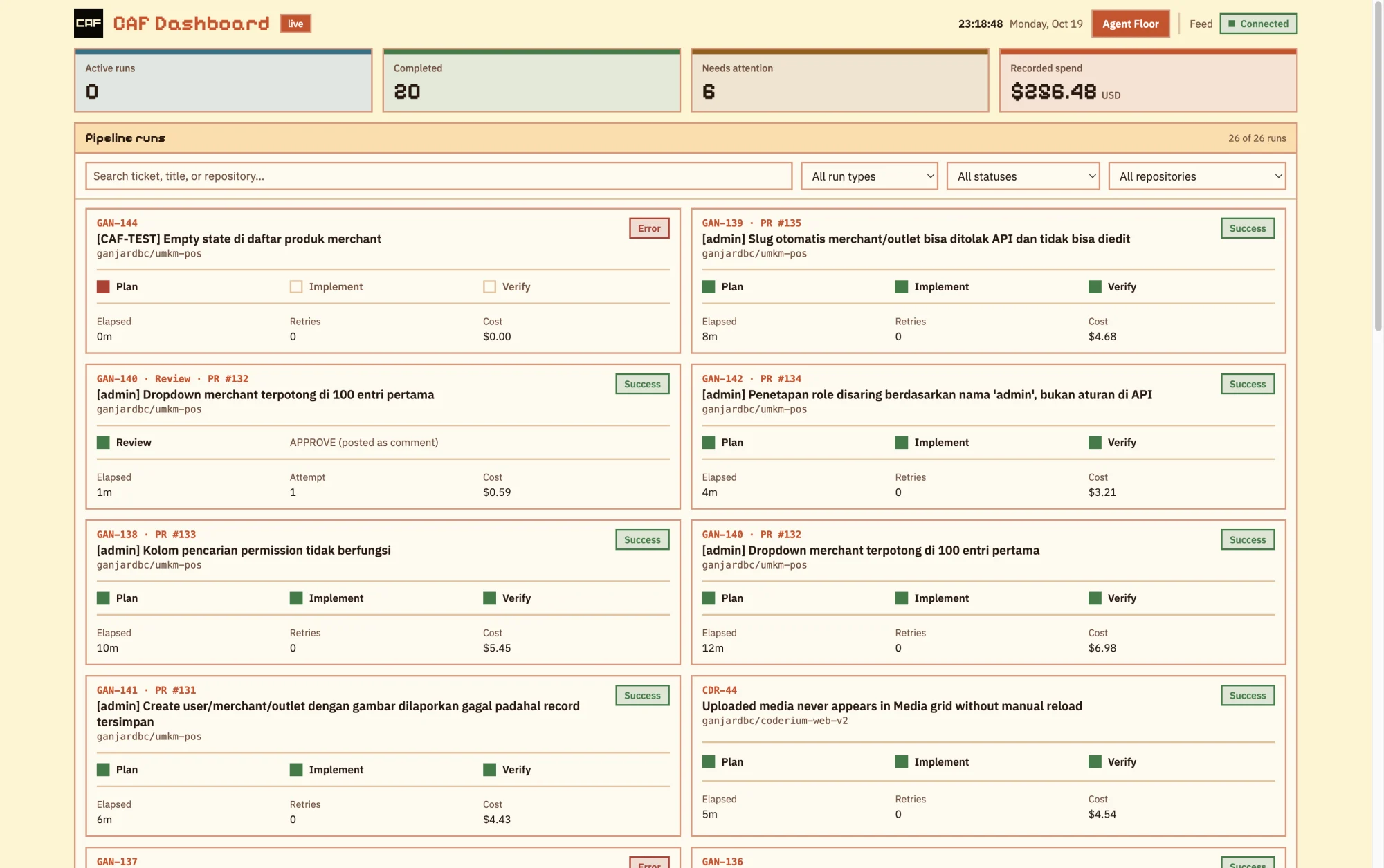
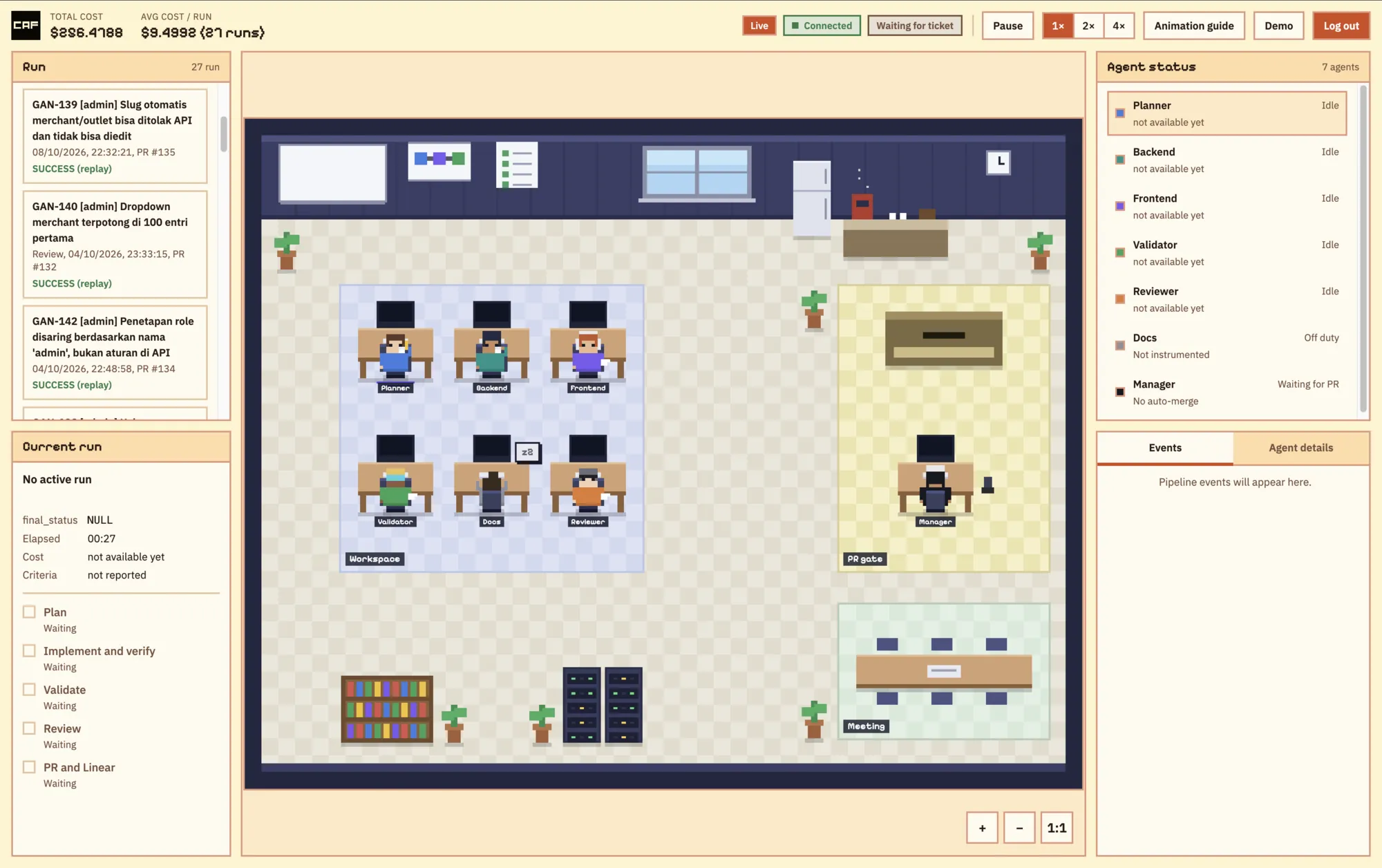
A live pipeline-monitoring dashboard is served by the web server at /dashboard:
PIV phase, retry counts per gate, real cost as reported by the claude CLI,
artifact links and PR review runs, updated in real time. A second, read-only view, the
Agent Floor, shows the same runs as an animated office of agents, with live, replay
and demo modes and the total and average cost in its header. DASHBOARD_DEFAULT_VIEW
(dashboard or agent-floor) in .env chooses which one /dashboard shows.
It is off by default and sits behind a login page at /dashboard/login. A successful
login sets a signed, HttpOnly session cookie that lasts 12 hours, and a Log out
button ends it. To enable it:
# caf.config.yaml
dashboard:
  enabled: true
  basicAuthUser: admin
and set DASHBOARD_BASIC_AUTH_PASSWORD in .env; those two are what you type on the
login page, and changing either signs everyone out. Run history is stored in a SQLite
file (db.path, default ./data/caf-dashboard.sqlite); pnpm db:migrate creates or
upgrades it.
Behind a reverse proxy, make sure /dashboard, /dashboard/login, /dashboard/logout,
/dashboard/floor/*, /api/pipelines* and /api/events/stream are all proxied, and
send X-Forwarded-Proto: https so the cookie gets the Secure flag. Serve it over
HTTPS only.
Terminal UI
pnpm tui (pnpm start:tui after a build) opens a terminal control panel for local
and ops use. It shows the same run data as the dashboard without a browser, a login or
a running web server, and it can start and stop the web server, the worker and the
Cloudflare tunnel for you.
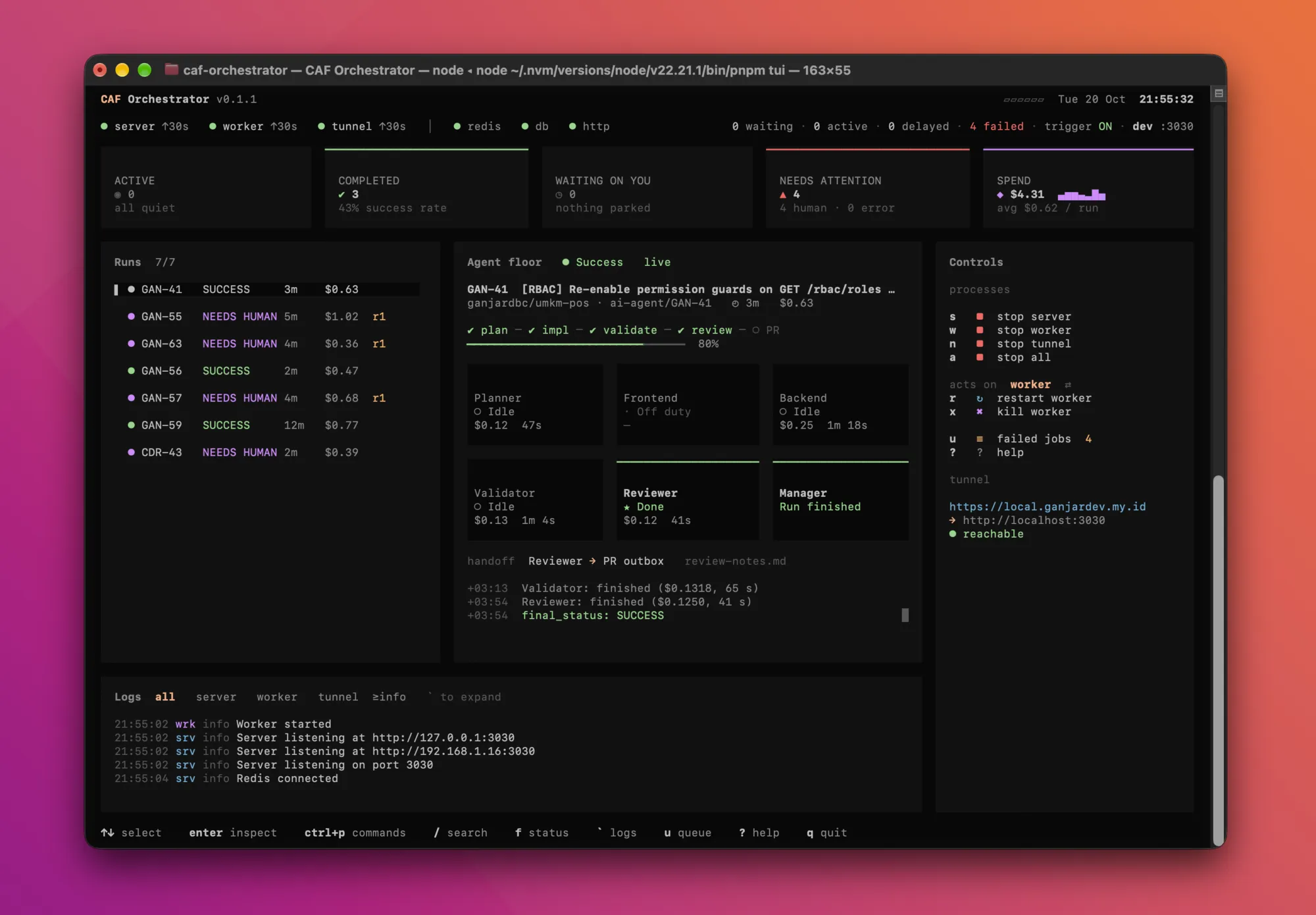
- Header — process status for server, worker and tunnel (running with uptime, changing, crashed with its exit code, or off), Redis / DB / HTTP health, and the queue counts (waiting, active, delayed, failed).
- Summary cards — active, completed (with success rate), waiting on you, needs attention, and spend with a cost sparkline and the average per run.
- Runs and Agent Floor — the run list on the left, running ones pinned on top; on
the right a text version of the Agent Floor for the selected run, with the step line
(
plan ─ spec ─ impl ─ validate ─ review ─ PR), one card per agent with state, cost and duration, the last handoff and the last events. It follows the newest running run;Ffollows live again after you pin another run. - Logs — live server, worker and tunnel output in a bottom drawer.
`expands it, and thealltab hides cloudflared's info-level chatter. - Controls — a sidebar of clickable rows for the three processes and
all,restartandkill, the failed-job list and help, plus the tunnel route and whether it is reachable. It is dropped below 110 columns; every action stays on its key and in the palette. - Command palette —
ctrl+plists every action: run mode (devordist), restart and kill target, copying the Linear, GitHub or health webhook URL fromTUNNEL_URLto the clipboard, search, filters, log controls and quit. - Failed jobs —
ulists them and1–9retries one after asking first. Retrying re-runs the whole pipeline from the Planner.
Common keys: s / w / n / a start or stop server / worker / tunnel / all, r
restart, x force kill, ↑↓ and Enter select and inspect a run, o opens its PR,
/ search, ? help and q quit, which stops the processes it started first.
It needs an interactive terminal, .env, caf.config.yaml and a reachable Redis
(REDIS_URL). Redis is only shown as up or down, not managed. If the config is
invalid the TUI still opens, lists the problems in a modal and refuses to start the
processes. The dist mode needs pnpm build first, and stopping the worker mid-job
waits for the job unless you kill it.
Cloudflare tunnel
n, or the tunnel row in the sidebar, runs cloudflared tunnel run as a third managed
process so Linear and GitHub webhooks can reach a local machine. The same tunnel runs
without the TUI as pnpm tunnel (pnpm start:tunnel after a build): it prints the
Linear and GitHub webhook URLs derived from TUNNEL_URL, then runs in the foreground.
Settings are in .env, none of them secrets:
| Variable | Default | Meaning |
|---|---|---|
TUNNEL_NAME | ai-code-review | Tunnel to run |
TUNNEL_URL | unset | Public https:// hostname routed to the tunnel; used only to print and probe webhook URLs |
TUNNEL_TARGET_URL | http://localhost:<server.port> | Local origin to expose |
CLOUDFLARED_BIN | cloudflared | Path to the cloudflared binary |
Optional features (off by default)
- Telegram notifications — pipeline start, completion and failure alerts. Set
TELEGRAM_BOT_TOKENandTELEGRAM_CHAT_IDtogether. - Model routing — route agents through an Anthropic-compatible endpoint such as
OpenRouter with
openai.useOpenai: trueplusOPENAI_API_KEY.agents.modelOverridespicks a model per agent, globally or per project. Every model id must be listed exactly inopenai.allowedModels; the list is empty (nothing allowed) by default. - Dynamic agent skip — Planner can emit a
## Skip Agentssection intasks.mdto skip agents that aren't relevant for a ticket. Enable withAGENT_SKIP_ENABLED=true. It never leaves zero implementation agents running, and skipping the validation gate or the Reviewer adds an explicit warning to the PR body. - Persistent workspace —
workspace.mode: persistentreuses one checkout per repo instead of cloning per job. Use it only for large repos: a second job for the same repo is rejected while the first holds the workspace.
Multi-repo
Multi-repo/multi-team routing is live: caf.config.yaml's projects: map
holds one entry per project (ticketPrefix, repoCloneUrl, baseBranch,
workspaceDir, optional agents.modelOverrides, specGateLabel and
orchestration.maxOrchestrationRetries). Incoming Linear tickets are routed by
matching the ticket key's prefix (e.g. ABC-123 → ABC) against a project's
ticketPrefix; GitHub-triggered jobs are routed by repo, and the ticket key is
<ticketPrefix>-<issue number>. Prefixes must be unique and workspace directories
must not overlap. At least one project must be configured — startup fails fast on an
empty projects: map.
Scope constraints
- Worker concurrency defaults to 1 — concurrent Claude Code agent processes are expensive.
- Only a pipeline that stopped cleanly at a gate, at a Clarify or at the spec gate can be resumed mid-way, and only on request. Anything else retries from the Planner.
- Only
caf-frontendandcaf-backendare routed as implementation agents;caf-architectandcaf-implementerare never run. - Persistent workspaces are locked in-process, so that mode assumes a single worker instance.
- The validator's command limit is an allowlist plus the text rules in its agent definition; the merge decision always stays with a human.
- Trackers: Linear and GitHub Issues. Git host: GitHub only (the Ready-for-review GraphQL call is built for github.com).